graphic that says 26 year anniversary 87% off ends soon! $599 $79 to launch your email marketing. Start for just $79 →
  • Sign-In
  • My Account
  • Get AWeber Free

Sign In

Features and Solutions

Email marketing Email automation Landing page builder Ecommerce Web push notifications Sign up form builder

Pricing

Standard pricing High volume pricing

Support

Contact Customer Solutions 24/7 AWeber Community Free account migration service Knowledge base Video tutorials

Resources

Landing Page Template Gallery Pre-written email campaigns AWeber Certified Experts App integrations Marketing guides Customer referral program Customer success stories Podcast Marketing Glossary 24/7 Email Marketing Master Class
Home
Learn
  • Email Marketing
  • Landing Pages
  • Grow Your Audience
  • Increase Your Reach
  • Make More Sales
  • Improve Your Writing & Design
  • What's New
  • Customer Playbooks

Any Form You Can Imagine, AI Signup Form Builder Can Create it

By Chris Vasquez May 20, 2026

Animated popups with custom triggers. Floating 3D buttons with hover effects. Scratch-card reveals. Gamified experiences. Multi-step forms with progress bars. These kind of forms used to require a developer or designer. Now with AWeber’s AI Signup Form Builder, you can have it by describing what you want in a single sentence.
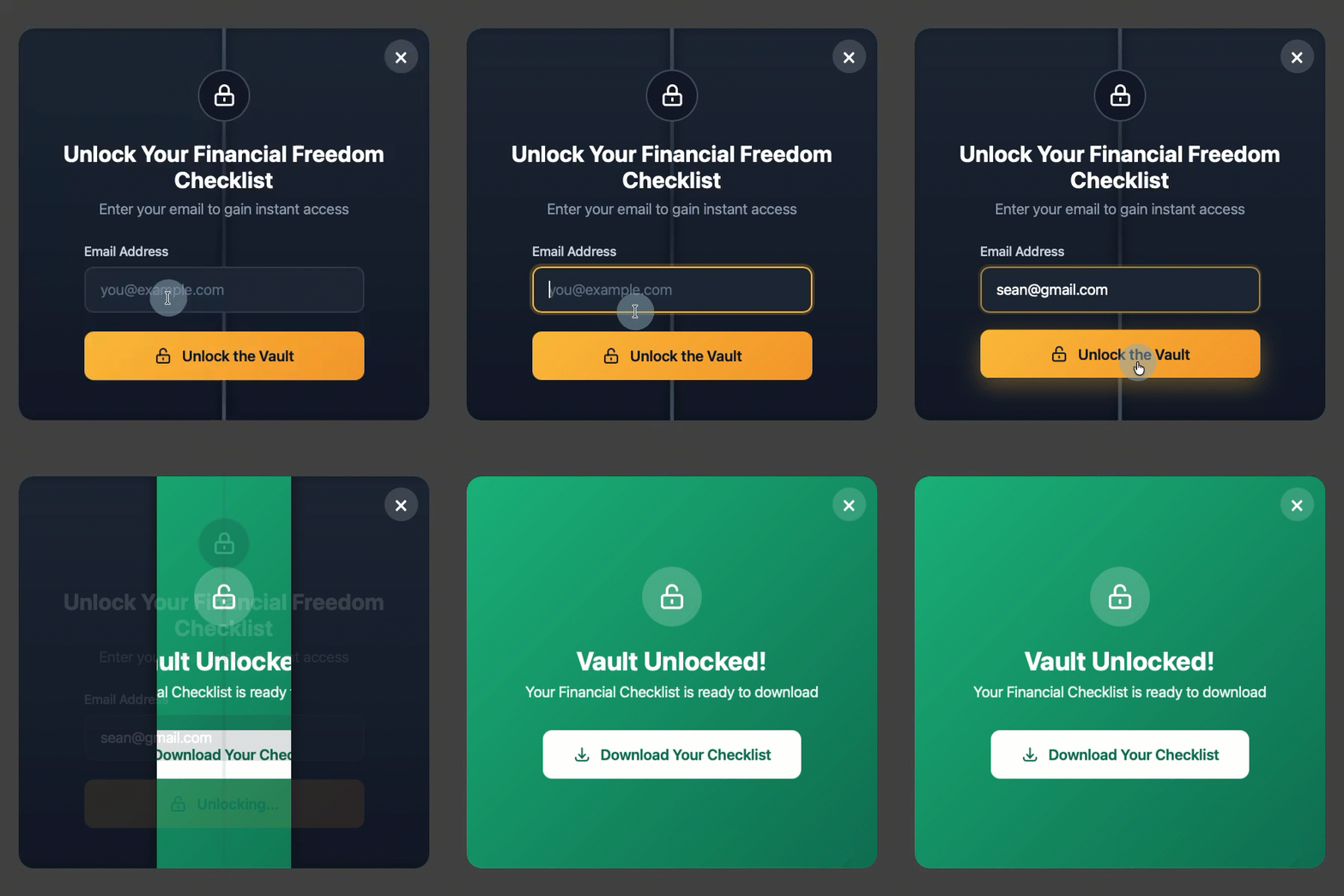
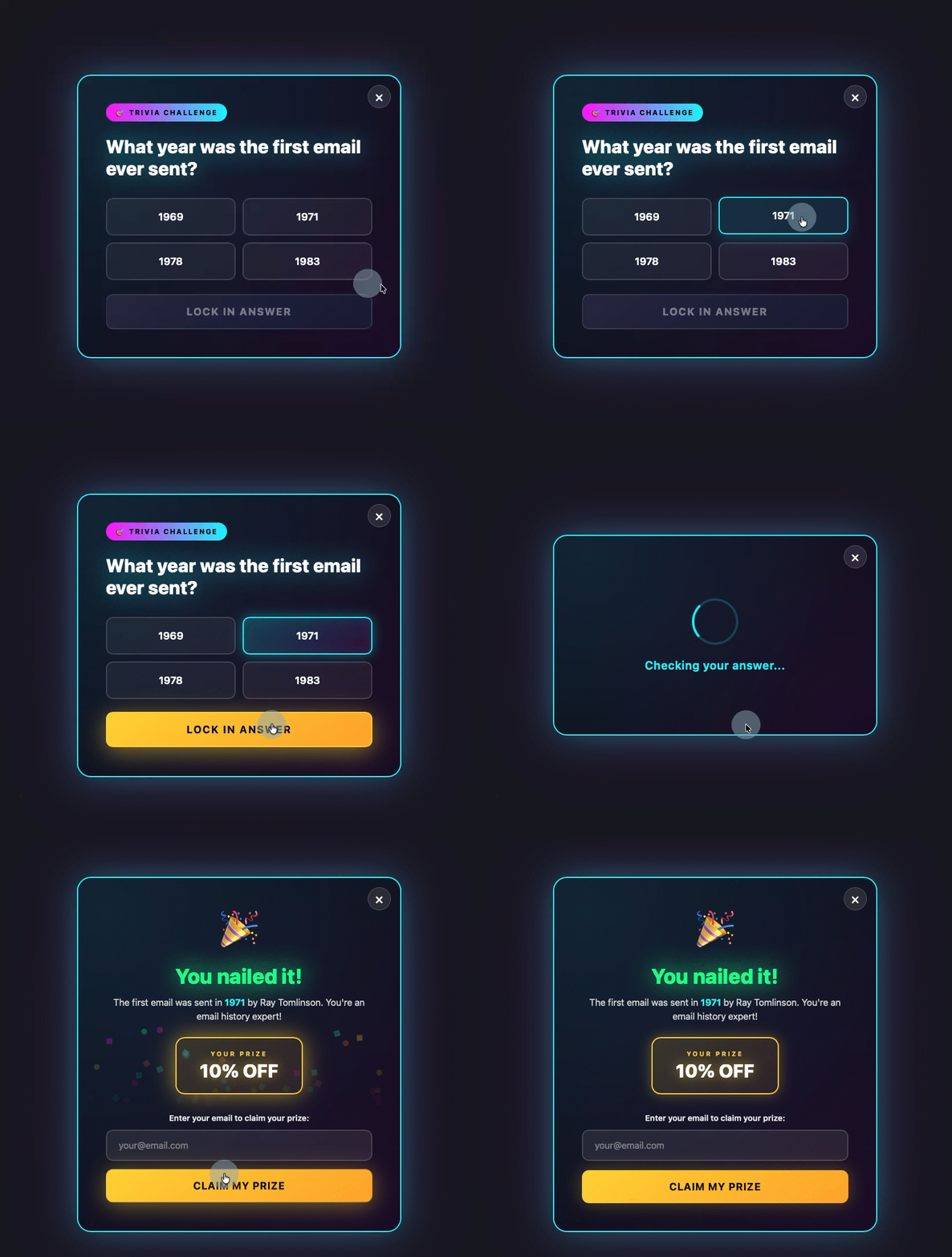
GIF showing dynamic AI Signup form in AWeber

Easy to get started

Every option is designed to give you a working form in just seconds.


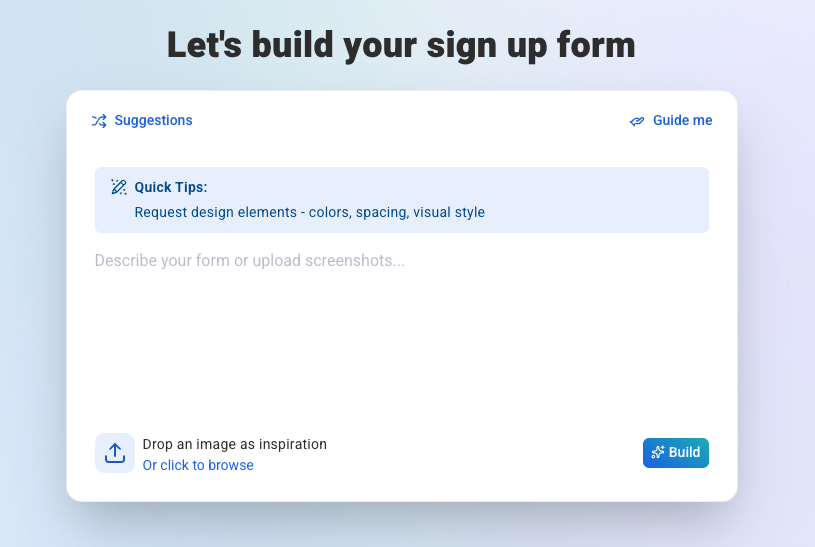
Free prompting

Describe your form in your own words. Quick tips help you write a stronger prompt.

Screenshot of the free style prompt field in AWeber for the AI signup form builder

Guided prompts

Suggested prompt guides you through building a form that converts.

GIF showing AWeber's guided prompt for AI signup form builder

Design from a screenshot

Upload a screenshot of any form you like. Tell the builder what to keep, and it adapts the design as your starting point.

Template gallery

Start with ready-to-use forms.

AWeber's AI Signup Form Builder Templates

Refine through chat, click to edit

A chat interface handles revisions once the form exists. Describe the change and the assistant does it.

You can also click directly on any text or button to move, copy, or delete it.

Upload images mid-conversation for visual inspiration.

Come back later and the builder picks up with full context on your current form.

Control who sees your forms

1. Page options show your form on all pages or select specific ones.
2. Frequency set visibility to every visitor, once per visitor, once per session, or on a select schedule.
3. Schedule a start or end date so your form turns on and off automatically.
4. Device show your form to all visitors, mobile only, or desktop only.

Preview mode shows appearance, animations, field validation, and thank-you page behavior before you go live. Reload the preview to replay animations from the start.

Maps automatically to custom fields

When your form collects info like favorite color or company name, the builder maps it to the right custom field in your account. No matching field? It creates one at publish.

Publish when you’re ready. The on/off switch enables or disables any form instantly. Set up your site once and every form you publish appears automatically.

Describe your first form

AWeber’s AI Signup Form Builder is available now in open beta.

What can you imagine up today?

Keep reading:

  • Draft, Send, and Analyze. All From ChatGPT

    Draft, Send, and Analyze. All From ChatGPT

  • Now you'll know if Gmail Clipped your email

    Now You'll Know If Gmail Clipped Your Email

Animated popups with custom triggers. Floating 3D buttons with hover effects. Scratch-card reveals. Gamified experiences. Multi-step forms with progress bars. These kind of forms used to require a developer or designer. Now with AWeber’s AI Signup Form Builder, you can have it by describing what you want in a single sentence.
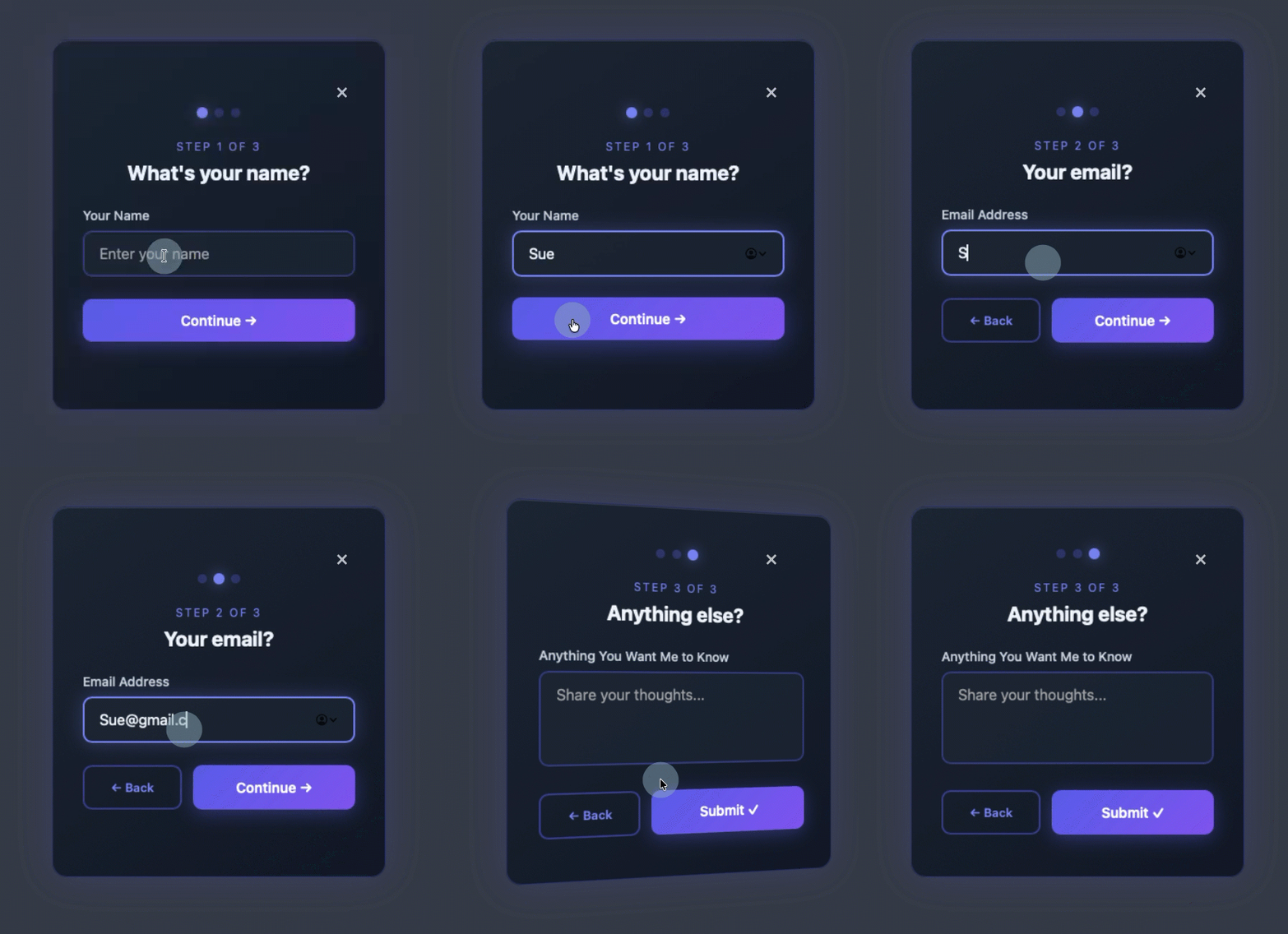
Easy to get started

Every option is designed to give you a working form in just seconds.

Free prompting

Describe your form in your own words. Quick tips help you write a stronger prompt.
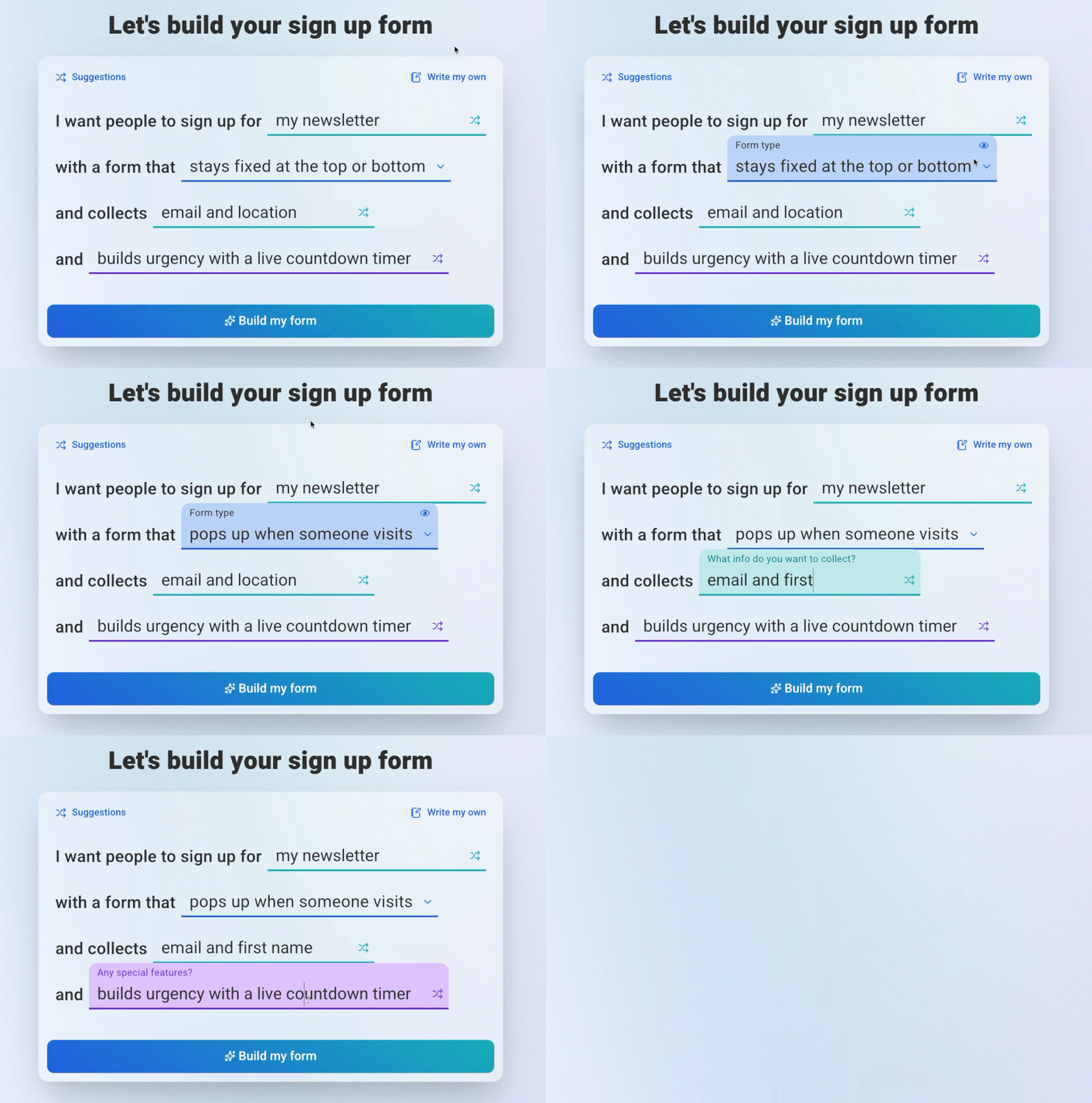
Guided prompts

Suggested prompt guides you through building a form that converts.
Design from a screenshot

Upload a screenshot of any form you like. Tell the builder what to keep, and it adapts the design as your starting point.

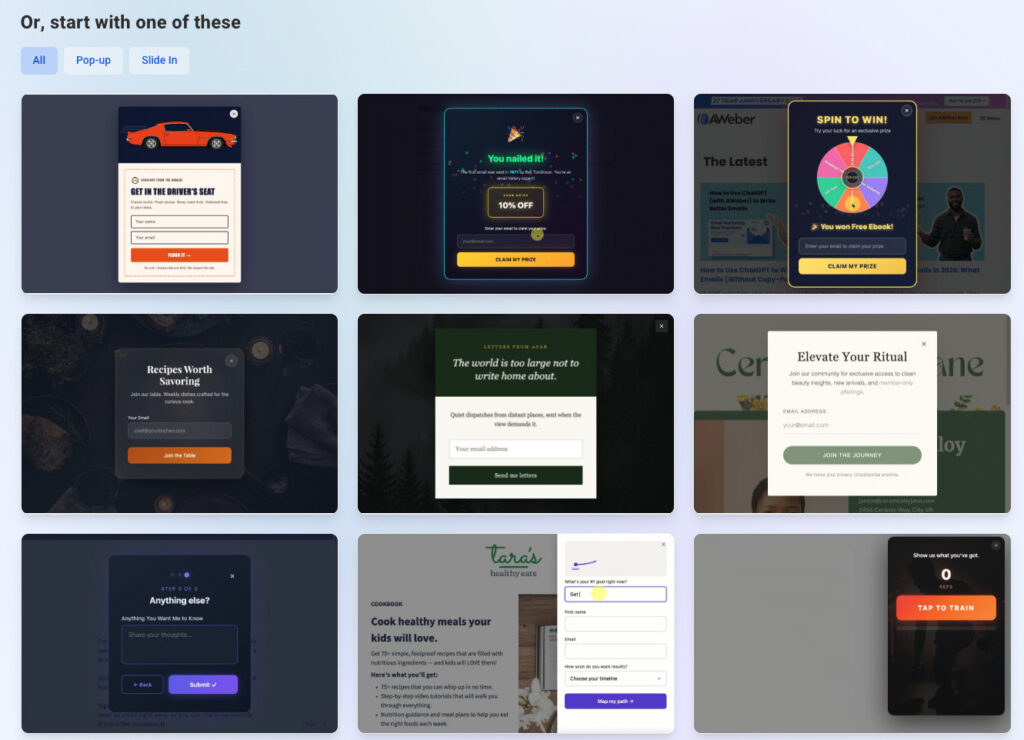
Template gallery

Start with ready-to-use forms.
Refine through chat, click to edit

A chat interface handles revisions once the form exists. Describe the change and the assistant does it.

You can also click directly on any text or button to move, copy, or delete it.

Upload images mid-conversation for visual inspiration.

Come back later and the builder picks up with full context on your current form.

Control who sees your forms

1. Page options show your form on all pages or select specific ones.2. Frequency set visibility to every visitor, once per visitor, once per session, or on a select schedule.3. Schedule a start or end date so your form turns on and off automatically.4. Device show your form to all visitors, mobile only, or desktop only.

Preview mode shows appearance, animations, field validation, and thank-you page behavior before you go live. Reload the preview to replay animations from the start.

Maps automatically to custom fields

When your form collects info like favorite color or company name, the builder maps it to the right custom field in your account. No matching field? It creates one at publish.

Publish when you’re ready. The on/off switch enables or disables any form instantly. Set up your site once and every form you publish appears automatically.

Describe your first form

AWeber’s AI Signup Form Builder is available now in open beta.

What can you imagine up today?

Keep reading:Draft, Send, and Analyze. All From ChatGPTNow You'll Know If Gmail Clipped Your Email

Posted By

Chris Vasquez

Product leader. Email marketing innovator.

Read more posts by Chris Vasquez

Tags

sign up forms

Share This Article

Tweet

Get everything you need to grow your business

All the solutions you need from day one—email, unlimited landing pages, and so much more—for free.
No credit card required. No time restrictions.

Start Your Newsletter Today
Support Center
  • Contact us
  • AWeber Community
  • Knowledge base
  • Custom templates
  • Video tutorials
  • Certified Experts
  • System status
About AWeber
  • About AWeber
  • Careers
  • Customer referral program
  • Pricing
Developers
  • Email Marketing API
  • Integrations
Press & Media
  • Press Releases
  • Speakers
Comparisons
  • Mailchimp
  • GetResponse
  • ConvertKit
  • Constant Contact

AWeber Communications
1100 Manor Drive Chalfont, PA 18914, USA
Toll Free: +1 877-293-2371

  • Facebook
  • Twitter
  • YouTube
  • Instagram
  • LinkedIn
  • Pinterest

Copyright © 1998-2026. Reproduction Strictly Prohibited. All Rights Reserved.
Privacy | Anti-Spam