 87% off ends soon!
 How to build an email list without a website (and what to send once you do)
By Jill Fanslau April 4, 2018
Your list is powerful.
Think of it as a room filled with people who have come to hear you talk. If they like what they hear, they’ll stick around. Many will ask questions. A bunch will purchase your products or services. And a handful will turn into advocates who bring others into the room.
To fill your room, you typically have a signup form on your website. Visitors can enter their email list to subscribe to your content.
But what happens if you don’t have a website?
Don’t worry: You can still gather subscribers into the room without creating a website.
All you need is a hosted sign up form.
What is a hosted sign up form?
A hosted signup form lives on its own. It has a unique URL that you can share anywhere, on Facebook, Instagram, in a text message, or even printed on a business card. It’s a standalone page designed to do one thing: collect email addresses and add subscribers to your list.
Already have a website? A hosted signup form is still worth creating. If your site ever goes down, you have a backup. And when you want to share a direct link to your list (no navigation, no distractions), the hosted form is what you send.
How to create a hosted signup form
The easiest way to create a hosted signup form is with the AI Signup Form Builder inside AWeber. It generates a complete, hosted signup form from a single prompt. Describe your business, and the builder creates a form with a headline, description, and design that matches your brand.
Here’s how it works:
Step 1: Open the AI Signup Form Builder. Log in to your AWeber account. Go to Pages & Forms and select AI Signup Forms.
Step 2: Describe your business. Tell the builder what you want. , who you serve, and what subscribers will get. Something like: “I’m a fitness coach for busy professionals. Subscribers get weekly workout plans and nutrition tips.” The AI uses this to write your headline, form copy, and choose a design.
Step 3: Review and customize. The builder generates your form instantly. Adjust the headline, colors, or layout if you want. Or leave it as-is and publish.
Step 4: Grab your hosted URL. Once published, AWeber gives you a unique link. That URL is your signup form. Share it anywhere people can click.
The entire process takes less than five minutes. No coding. No design decisions you have to make from scratch. The AI handles the first draft, and you refine from there.
Now, share your hosted sign up form.
Social
Get your followers excited to sign up for your list by telling about all the great stuff they can expect to get in their inbox. If you write regular blog posts, tell them that by signing up, they’ll never miss a post from you.
Another way to share your hosted form on social media is to reach out directly to friends and influencers who you think could benefit from being a part of your list. Don’t overdo it, though. Sharing your form with a bunch of random people will make you look like a spammer.
Emails
Add a link to your hosted sign up form in your email signature. You don’t have to go into great detail explaining the value of your email list here, but make it clear that you’re linking to your email list.
If you regularly send emails to business associates, colleagues, or anyone else in your industry, make a list of people who you think would be most interested in your email list, then message them directly to personally invite them to sign up for your list.
Guest blog posts
Guest blogging is an awesome way to grow your audience. If you write articles for someone else’s blog, include a link to your hosted form either within your blog post or in your signature. Let people know that if they want to see more content from you, all they have to do is sign up. (Here’s how one blogger does it.)
Level-up with a dedicated subscribe page.
Consider adding a dedicated subscribe page to your to-do list. A dedicated subscribe page is a landing page whose sole job is to promote your email list. It’s basically a glorified hosted sign up form, if you will. In addition to your sign up form, it can include a list of reasons to sign up, go into more detail about you incentive offer and offer social proof.
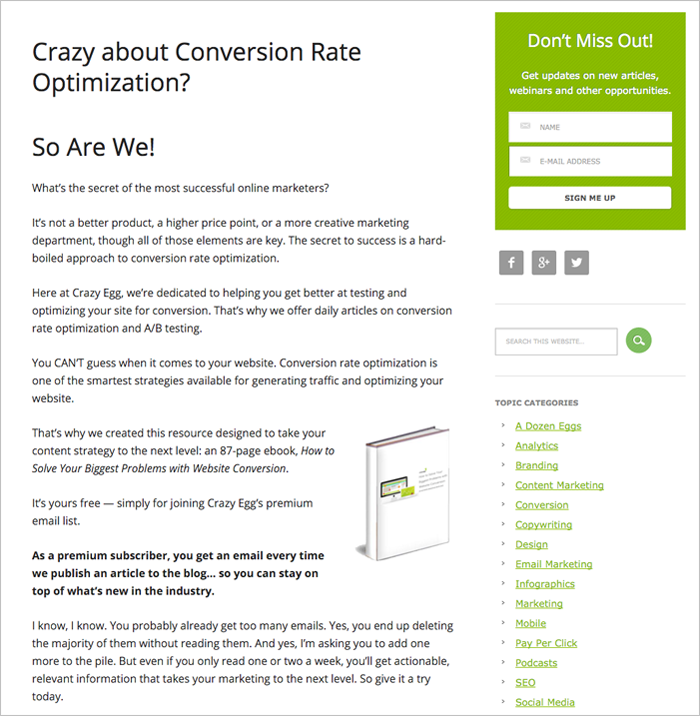
Dedicated subscribe pages can be incredibly effective. The Daily Egg tripled their subscriber list with the help of a dedicated subscribe page. Here’s what The Daily Egg’s subscribe page looks like:
Here are a few tools that can help you create a dedicated subscribe page in a snap:
- Wishpond lets you create easy-to-edit landing pages and integrates with Google Ads and Facebook Ads
- OptimizePress helps you make high-quality opt-in pages that work with your WordPress site.
- LeadPages helps you create and customize a wide variety of landing pages.
- Instapage has a drag and drop editor that makes it easy to create great-looking landing pages.
Learn more about creating sign up forms that get results.
- How to design the best landing page for your email marketing
- How to turn your sign up form into a subscriber magnet
- How to personalize your email list call to action to get 10x more signups
- 16 proven sign up form ideas to grow your email list
What are you waiting for? Log in to your AWeber account and create your hosted sign up form.
Not an AWeber customer yet? Start your free trial today!
Additional reporting by Kristen Dunleavy.


