Signup form templates are holding you back (there’s a better way)
Sean Tinney
A signup form template sounds like a shortcut. It isn’t.
You browse a gallery, pick the closest match, then spend the next hour adjusting fields, rewriting the headline, swapping colors, and rearranging the layout until it looks like something that belongs to your business. You started from someone else’s form and worked backward.
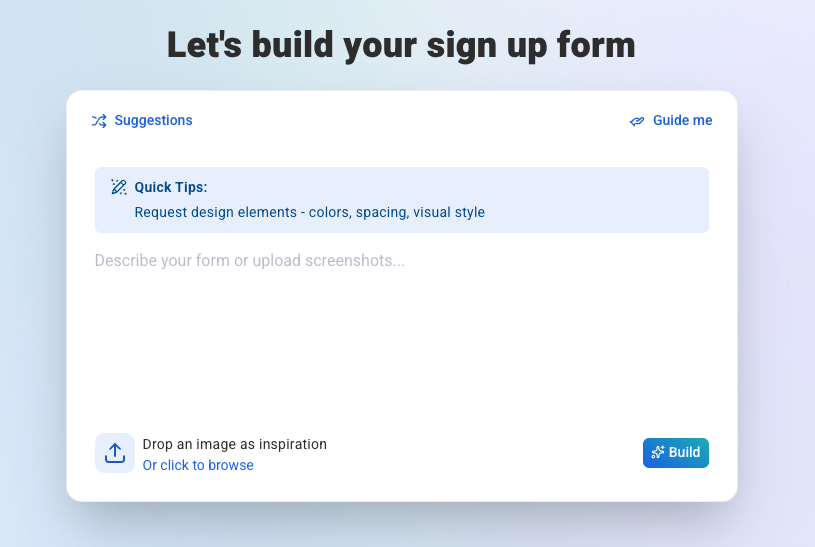
AI form builders, like AWeber’s AI Signup Form Builder, change that. Describe what you need, upload a screenshot of a design you like, or answer a few prompts. You get a form built for your specific business from the start. No template hunting. No generic copy to overwrite.
What’s wrong with signup form templates
Templates are built to work for as many people as possible. That’s exactly what makes them a poor fit for you.
Every template ships with a generic headline, a default field set, and a layout optimized for nobody in particular. You get “Subscribe to our newsletter” when your offer is a free five-day email course on dog training. You get three fields when you only need one. You get a two-column layout when your brand is minimal.
The gap between “template” and “your actual form” requires real work. Copywriting, design decisions, field logic. By the time the form looks right, you’ve spent more time customizing than you would have starting from scratch with a clear prompt.
There’s another problem: templates anchor your thinking. You start with someone else’s structure and adapt around it. That’s a different creative process than building for your audience from the ground up.
A bettter way: AI Signup Form Builder
An AI Signup Form Builder starts with you, not a template gallery.
To give you an idea of how they work, we’ll use AWeber’s as an example.
You have three core ways to create forms:
1. Describe it
Type what you need in plain language. “A simple one-field form for a free guide on meal planning for busy parents.” The builder generates a form matched to that description: relevant headline, appropriate fields, copy that fits the offer.
2. Upload a screenshot
Found a form you like somewhere online? Upload a screenshot. The builder reads the design, takes cues from the layout and structure, then produces a version customized to your brand. You’re not locked into copying it. You’re using it as creative inspiration without the manual rebuild.
3. Use guided prompts
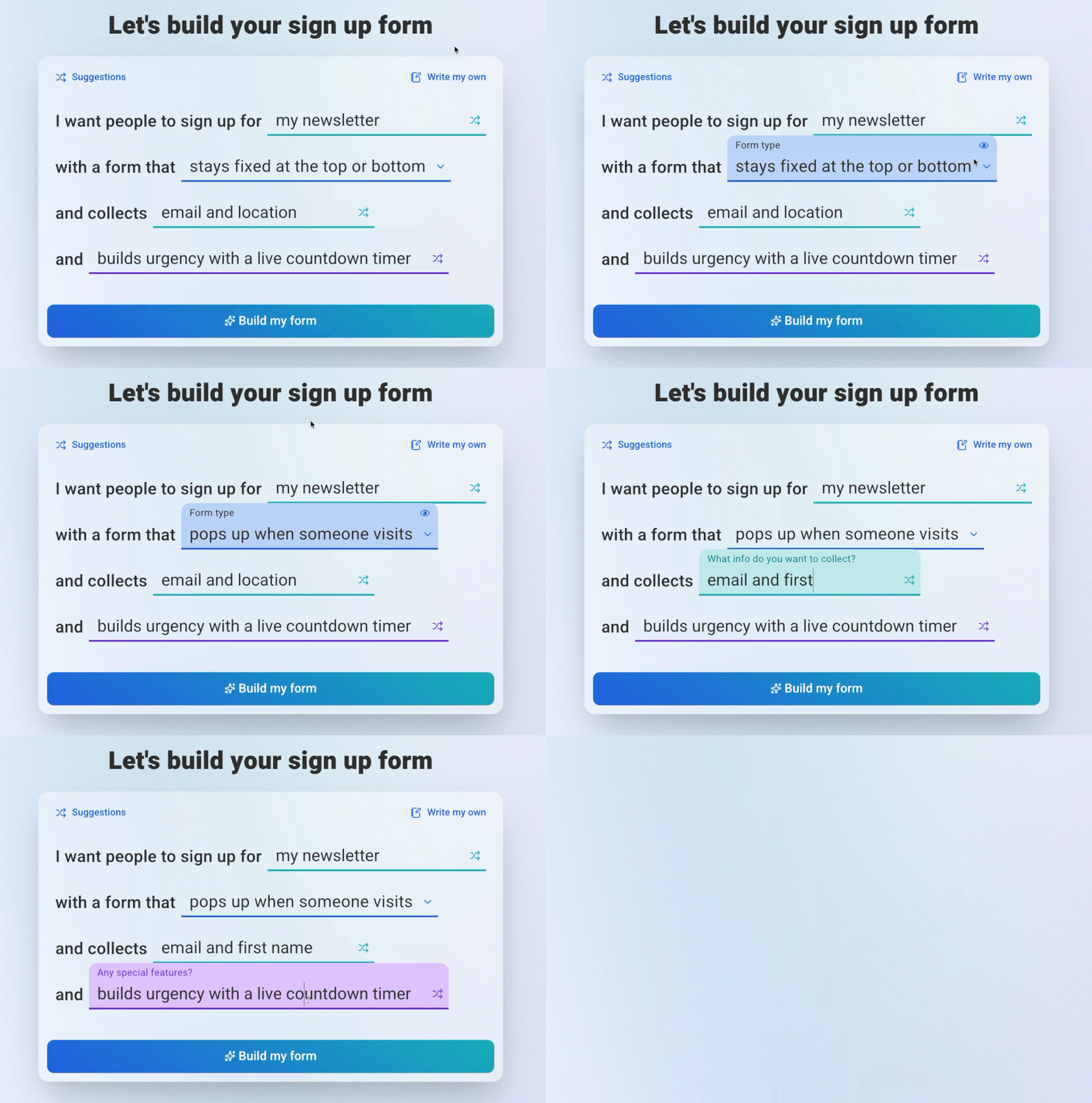
Answer a few questions about your audience, offer, and goals. The builder assembles a form from your answers. Specific inputs produce specific output.
After the initial build, you refine through conversation. Tell it to shorten the headline, add a checkbox, change the button text. The form updates without you touching a field editor. Each change happens in plain language, not a settings panel.
Look at the comparison of an AI form builder using AWeber versus a drag and drop builder. The speed and quality of a form created using the AI Form Builder is unmatched.
What you actually get versus a template gallery
With a template gallery, you’re choosing from a fixed set of options. The form that fits your brand may not exist yet. If it doesn’t, you’re compromising.
With the AI builder, there’s no fixed set. The form is generated from your inputs. That means the headline matches your offer, the field count matches your ask, and the copy sounds like your brand rather than a product demo.
Take this example: A fitness coach needs different copy and a different feel than a B2B SaaS tool. A template gallery serves both of them the same starting point. The AI builder starts from the description you give it.
Watch how Alycia using Stu McLaren’s brand as inspiration to create a custom form using the AI Signup Form Builder in AWeber.
When a template can still be useful
Templates aren’t useless. They’re useful in a specific way: inspiration.
If you’ve seen a form that stopped you mid-scroll, that’s worth saving. The layout, the CTA, the field structure. Not to copy, but to understand what caught your attention.
That’s where the screenshot feature earns its keep. Grab a screenshot of any form that inspires you, upload it to the AI Signup Form Builder, and describe your business. The builder takes the structural cues from the design you liked and applies them to a form that belongs to you.
You get the inspiration without the imitation. The creative shortcut without the brand mismatch.
Build your first form in minutes
Open AWeber, select the AI Signup Form Builder, and type one sentence describing your offer. That’s the starting point. No template browsing, no layout compromises, no copy you have to overwrite.
The form is ready when you are. And the subscribers it collects will get your welcome email the moment they sign up.
Sean Tinney is a content marketer at AWeber with 15+ years working directly with small business owners on email strategy, list building, and automation. He focuses on what actually moves the needle for businesses without large marketing teams.Connect with Sean on LinkedIn
Sean Tinney
A signup form template sounds like a shortcut. It isn’t.

You browse a gallery, pick the closest match, then spend the next hour adjusting fields, rewriting the headline, swapping colors, and rearranging the layout until it looks like something that belongs to your business. You started from someone else’s form and worked backward.

AI form builders, like AWeber’s AI Signup Form Builder, change that. Describe what you need, upload a screenshot of a design you like, or answer a few prompts. You get a form built for your specific business from the start. No template hunting. No generic copy to overwrite.

What’s wrong with signup form templates

Templates are built to work for as many people as possible. That’s exactly what makes them a poor fit for you.

Every template ships with a generic headline, a default field set, and a layout optimized for nobody in particular. You get “Subscribe to our newsletter” when your offer is a free five-day email course on dog training. You get three fields when you only need one. You get a two-column layout when your brand is minimal.

The gap between “template” and “your actual form” requires real work. Copywriting, design decisions, field logic. By the time the form looks right, you’ve spent more time customizing than you would have starting from scratch with a clear prompt.

There’s another problem: templates anchor your thinking. You start with someone else’s structure and adapt around it. That’s a different creative process than building for your audience from the ground up.

A bettter way: AI Signup Form Builder

An AI Signup Form Builder starts with you, not a template gallery.

To give you an idea of how they work, we’ll use AWeber’s as an example.

You have three core ways to create forms:

1. Describe it

Type what you need in plain language. “A simple one-field form for a free guide on meal planning for busy parents.” The builder generates a form matched to that description: relevant headline, appropriate fields, copy that fits the offer.

2. Upload a screenshot

Found a form you like somewhere online? Upload a screenshot. The builder reads the design, takes cues from the layout and structure, then produces a version customized to your brand. You’re not locked into copying it. You’re using it as creative inspiration without the manual rebuild.

3. Use guided prompts

Answer a few questions about your audience, offer, and goals. The builder assembles a form from your answers. Specific inputs produce specific output.

After the initial build, you refine through conversation. Tell it to shorten the headline, add a checkbox, change the button text. The form updates without you touching a field editor. Each change happens in plain language, not a settings panel.

Look at the comparison of an AI form builder using AWeber versus a drag and drop builder. The speed and quality of a form created using the AI Form Builder is unmatched.

What you actually get versus a template gallery

With a template gallery, you’re choosing from a fixed set of options. The form that fits your brand may not exist yet. If it doesn’t, you’re compromising.

With the AI builder, there’s no fixed set. The form is generated from your inputs. That means the headline matches your offer, the field count matches your ask, and the copy sounds like your brand rather than a product demo.

Take this example: A fitness coach needs different copy and a different feel than a B2B SaaS tool. A template gallery serves both of them the same starting point. The AI builder starts from the description you give it.

Watch how Alycia using Stu McLaren’s brand as inspiration to create a custom form using the AI Signup Form Builder in AWeber.

When a template can still be useful

Templates aren’t useless. They’re useful in a specific way: inspiration.

If you’ve seen a form that stopped you mid-scroll, that’s worth saving. The layout, the CTA, the field structure. Not to copy, but to understand what caught your attention.

That’s where the screenshot feature earns its keep. Grab a screenshot of any form that inspires you, upload it to the AI Signup Form Builder, and describe your business. The builder takes the structural cues from the design you liked and applies them to a form that belongs to you.

You get the inspiration without the imitation. The creative shortcut without the brand mismatch.

Build your first form in minutes

Open AWeber, select the AI Signup Form Builder, and type one sentence describing your offer. That’s the starting point. No template browsing, no layout compromises, no copy you have to overwrite.

The form is ready when you are. And the subscribers it collects will get your welcome email the moment they sign up.

Try AWeber free for 14 days and build your first AI-generated signup form today.

Sean Tinney is a content marketer at AWeber with 15+ years working directly with small business owners on email strategy, list building, and automation. He focuses on what actually moves the needle for businesses without large marketing teams. Connect with Sean on LinkedInSean Tinney